
A launch monitor is useful when it answers a question a golfer actually has. How far does a 7-iron carry on a normal strike? Is the driver producing a consistent ball speed? Are two clubs leaving a distance gap that needs attention? A device that helps answer those questions can bring purpose to a practice session. One that produces a screen full of numbers without a clear use for them can quickly become an expensive accessory.
Best Launch Monitor Under $1000: Top Picks for 2026
 Written byJustin Wilcox, Founder and editorLast updated October 2, 2026
Some links in this review earn us a commission at no cost to you. It never changes what we recommend.
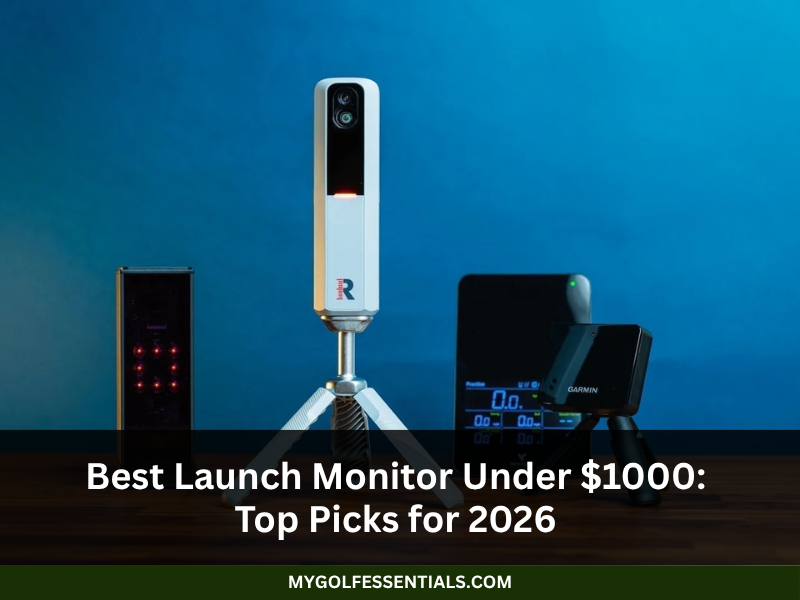
The under-$1,000 market has several types of launch monitors, from portable radar units to camera-based systems designed with indoor practice in mind. Some pair shot data with video or simulator software; others keep the experience more focused. The differences are not just technical. They affect where a monitor can be used, how much space it needs, and what else a buyer may have to pay for.
This guide considers six models commonly compared in this price range: Rapsodo MLM2PRO, Square Golf, Garmin Approach R10, Voice Caddie SC4 Pro, Shot Scope LM1, and FlightScope Mevo. It is a research-based buyer’s guide, not a report of side-by-side testing. Product packages, prices, compatibility, and subscription terms can change, so those details should be confirmed with the manufacturer or retailer before purchase.
The launch monitors worth comparing
Rapsodo MLM2PRO: when the swing matters as much as the shot
A distance number tells part of the story. It does not show what happened during the swing that produced it. The Rapsodo MLM2PRO is designed for golfers who want to connect shot information with video-related feedback through its app. That combination can make a practice session easier to review, particularly for players who like to compare swings and look for patterns over time.
The app is central to the experience, so compatibility should be checked before purchase. Buyers should confirm support for their phone or tablet, identify which functions are included, and review whether advanced tools require a subscription. It is also worth checking the package contents carefully, since accessories and bundles can vary.
The MLM2PRO will be of most interest to a golfer who expects to use its connected features regularly. Someone who only wants quick distance feedback may not need that extra layer, and could compare simpler devices instead.
Square Golf: think about the room before the monitor
Square Golf is oriented toward indoor practice and simulator use. That makes it relevant to golfers planning a more permanent hitting area at home. Practising indoors can remove some of the usual barriers weather, daylight, and travel but it also turns the room itself into part of the equipment.
Before choosing an indoor monitor, it helps to measure the hitting area and think through the full arrangement. The mat, net or impact screen, display, and software may all add to the cost. Lighting and device placement also matter, so a product that looks straightforward in a demonstration may require more planning in a multipurpose room.
Square Golf deserves a look when home practice is the main objective. Its suitability depends on the current system requirements and how well they match the buyer’s space. Confirm software compatibility, included accessories, and total setup costs rather than judging it by the monitor’s price alone.
Garmin Approach R10: portable, with a broad feature set
The Garmin Approach R10 is a compact radar-based monitor intended for golfers who want to take their practice setup with them. Portability is an obvious advantage for range sessions, while Garmin’s connected golf features add options beyond a basic shot readout.
The practical question is where it will be used. Radar tracking requires correct positioning and adequate space around the ball. Outdoors, that may be relatively easy to arrange; indoors, a garage or spare room can feel tight once the monitor, golfer, and net are all in place. Checking the latest Garmin setup guidance before buying can prevent an avoidable mismatch.
The R10 is worth comparing for golfers who value a portable device and want access to practice or simulation-related functions. Buyers should also check which features are included and which depend on compatible devices, software, or paid services.
Voice Caddie SC4 Pro: straightforward feedback
Not every golfer wants to build a simulator or spend practice time moving between app screens. The Voice Caddie SC4 Pro is an option for players who want shot information in a practice-focused format, including feedback available through the device itself.
Its value comes down to whether the available measurements are the ones the golfer will use. Someone working on distance control may have little need for features aimed at detailed swing analysis. Another player may want more extensive data or software connections. Checking the current metric list, setup recommendations, and included accessories will make the comparison more useful than relying on broad product descriptions.
The SC4 Pro belongs on a shortlist when direct feedback and a manageable setup matter. A buyer should compare it with similar models based on the actual practice questions each can answer.
Shot Scope LM1: a focused practice companion
A launch monitor does not need to do everything to earn a place in a golf bag. The Shot Scope LM1 is a more focused option for golfers interested in collecting shot information and using it to make practice more consistent. Basic data can still be valuable: repeated sessions may reveal distance patterns that are hard to judge by eye.
The trade-off with a simpler product can be fewer advanced measurements or fewer extras such as video and simulation. That is not necessarily a drawback. It matters only if those missing features are part of the golfer’s plan. The current specifications should be checked against the measurements needed, rather than assuming that all launch monitors provide the same data.
The LM1 may suit someone who wants to keep the process uncomplicated and concentrate on core feedback. It should be compared on clarity, supported metrics, and ease of use not on feature count alone.
FlightScope Mevo: compact radar for practice on the move
The original FlightScope Mevo is a compact radar-based launch monitor designed to travel between practice locations. Its small form can appeal to golfers who want shot feedback at a driving range without carrying a large setup.
It is important to distinguish the original Mevo from other FlightScope products, which may have different capabilities and prices. Before buying, confirm the exact model, the measurements it supports, software requirements, and what comes in the box. That simple check can prevent comparisons between products that share a brand name but serve different needs.
As with other radar systems, indoor use depends on having enough room and following the recommended positioning. For a golfer who practises mainly outdoors, those conditions may be easier to meet. Mevo is worth comparing when portability and core shot tracking are more important than a large suite of connected features.
What is the most accurate launch monitor under $1000?
There is no single answer that applies to every measurement and every practice environment. Accuracy depends on the metric being measured, the technology used, setup, and the conditions around the shot. Radar-based systems track the ball through a detection area, while camera-based systems analyze visual information. Neither approach should be assumed to perform identically across all measurements.
Independent testing is the most useful way to compare accuracy, especially when tests use the same metrics and similar conditions. Look for information about the test setup, reference equipment, and whether a displayed figure is measured directly or calculated. Alignment, lighting, room dimensions, ball type, and positioning can affect readings. Consistency also matters: for practice, repeatable results in the golfer’s normal environment can be more useful than a headline claim without a clear testing method.
Radar or camera: the setup is part of the decision
Radar monitors such as the Garmin Approach R10 and FlightScope Mevo follow the ball through a tracking area. They can be convenient outdoors, where the shot has room to travel. Indoors, the space required around the hitting position can become a deciding factor. A room that looks large enough when empty may feel different after adding a mat, net, and the golfer’s full swing.
Camera-based systems analyze images around impact. They can be a practical match for indoor practice when lighting and positioning meet the manufacturer’s requirements. The technology does not remove setup considerations; it changes which conditions need attention.
The choice is less about one method being universally superior and more about the environment. Measuring the room and deciding how the monitor will be used is a sensible first step. From there, the golfer can compare the products that actually fit those conditions.
Garmin R10 or Rapsodo MLM2PRO?
The Garmin Approach R10 and Rapsodo MLM2PRO overlap as consumer launch monitors, but they emphasize different parts of the practice experience. The R10 is a portable radar-based option with practice and simulation-related features. The MLM2PRO puts more emphasis on app-connected feedback, including video-related tools.
A golfer who wants a device to carry between locations may focus on the R10’s portability and Garmin ecosystem. Someone who expects to review video alongside shot outcomes may be more interested in the Rapsodo approach. The useful comparison is not a blanket verdict; it is whether the features, space requirements, supported devices, and ongoing costs fit the way the monitor will be used.
Five checks before spending the money
· Measure the available space. Check the exact model’s placement and tracking requirements, particularly for indoor radar use.
· Decide which numbers matter. Choose measurements tied to a practice goal, such as distance gapping or monitoring ball speed.
· Review subscriptions. Identify which app functions, simulator courses, or analysis tools require recurring payment.
· Confirm compatibility. Check supported phones, tablets, operating systems, and simulator software for the specific model.
· Budget for the complete setup. A mat, net, screen, display, and accessories may be separate from the monitor’s advertised price.
A feature list can make a product look impressive, but a golfer is unlikely to benefit from tools that never make it into the practice routine. A few relevant measurements, collected consistently and reviewed with a clear purpose, can be easier to act on than a crowded dashboard.
Final thoughts
The Best Launch Monitor under $1,000 is the one that fits the golfer’s space and makes practice more informative. Rapsodo MLM2PRO combines shot information with video-related feedback; Garmin Approach R10 and FlightScope Mevo offer portable radar-based tracking; Square Golf is aimed at indoor practice and simulation; while Voice Caddie SC4 Pro and Shot Scope LM1 provide other approaches to accessible shot feedback.
Before choosing, confirm the current price, supported measurements, room requirements, software terms, and cost of any equipment needed to complete the setup. Those details may not be as exciting as a feature headline, but they are what help determine whether the monitor will be useful after the first few sessions.
Key Takeaways
1. Start with the practice space and routine, not the longest feature list.
2. Radar-based monitors can work well outdoors but need suitable tracking space.
3. Camera-based systems may suit indoor use when lighting and positioning are right.
4. Rapsodo MLM2PRO links shot information with app-based video feedback.
5. Square Golf is aimed at golfers interested in indoor practice and simulation.
6. Garmin Approach R10 offers a portable radar-based option with connected features.
7. Voice Caddie SC4 Pro is worth comparing for direct practice feedback.
8. Shot Scope LM1 focuses on collecting core shot information without excess complexity.
9. FlightScope Mevo is a compact option for golfers who practise in different locations.
10. Subscriptions and setup equipment can make the final cost higher than the device price.
Frequently asked questions
Is there a cheaper alternative to TrackMan?
Yes. Consumer monitors from brands such as Garmin, Rapsodo, FlightScope, Voice Caddie, and Shot Scope are available at prices below many professional TrackMan systems. They can provide useful feedback for recreational practice, but capabilities and intended uses vary. A lower price should not be taken to mean identical performance across all metrics or equal suitability for professional club fitting. Compare the exact functions needed for the intended use.
Can a launch monitor under $1,000 help improve practice?
Yes. A launch monitor can make sessions more measurable by showing distance and other supported metrics. That information can help golfers compare clubs, notice distance gaps, and track consistency over time. The device does not create improvement by itself. Its value depends on how the readings are interpreted and used alongside purposeful practice, sound technique, and, when appropriate, instruction.
Is the Garmin Approach R10 suitable for indoor use?
Yes, if the room meets the manufacturer’s current tracking and placement requirements. Radar-based devices need enough space around the hitting area, so some small rooms may not be suitable. Check Garmin’s setup instructions before arranging the mat and net, and allow for correct alignment. A cramped or poorly arranged setup may make the monitor inconvenient and reduce the usefulness of the readings.
Can the Rapsodo MLM2PRO be used without a subscription?
Some functions may be available without a paid plan, while access to advanced app tools or content can depend on current membership terms. These terms can change, so the latest Rapsodo information should be checked before purchase. Buyers should identify which features are included in the device price and whether the planned practice routine relies on any subscription-only functions.
Is a more expensive launch monitor always more accurate?
No. Price alone does not establish accuracy. Performance depends on the technology, the metric being measured, setup conditions, and the quality of independent validation. Higher-priced models may offer more measurements, software, or fitting tools, but those additions do not automatically make every reading more accurate. Comparisons are strongest when the same metrics are assessed under similar conditions.